
Are you wondering about "How Do I Use Beem"?
If you are new to Beem and wondering how to get started, this guide walks you through everything step by step. You will learn how to set up your account, connect your bank, use emergency cash features, build credit, compare insurance quotes, and save money with built-in tools.
Beem is a financial technology platform designed to help users manage everyday money needs in one place. Instead of downloading separate apps for cash advances, credit building, insurance comparisons, and budgeting, Beem brings these smart AI tools together inside a single mobile app.
Let’s break down exactly how to use Beem in simple, practical terms.
What Can You Do With Beem?
Before jumping into setup, it helps to understand what Beem offers. Inside the app, you can:
Access emergency cash through Everdraft™
Use a free credit builder card to improve your credit score
Compare car insurance quotes from multiple providers
Discover discounts through DealsGPT
Track spending and manage budgeting tools
Each feature is designed to support everyday financial needs, especially if you live paycheck to paycheck or want to improve your financial stability.
Step 1: Download the Beem App
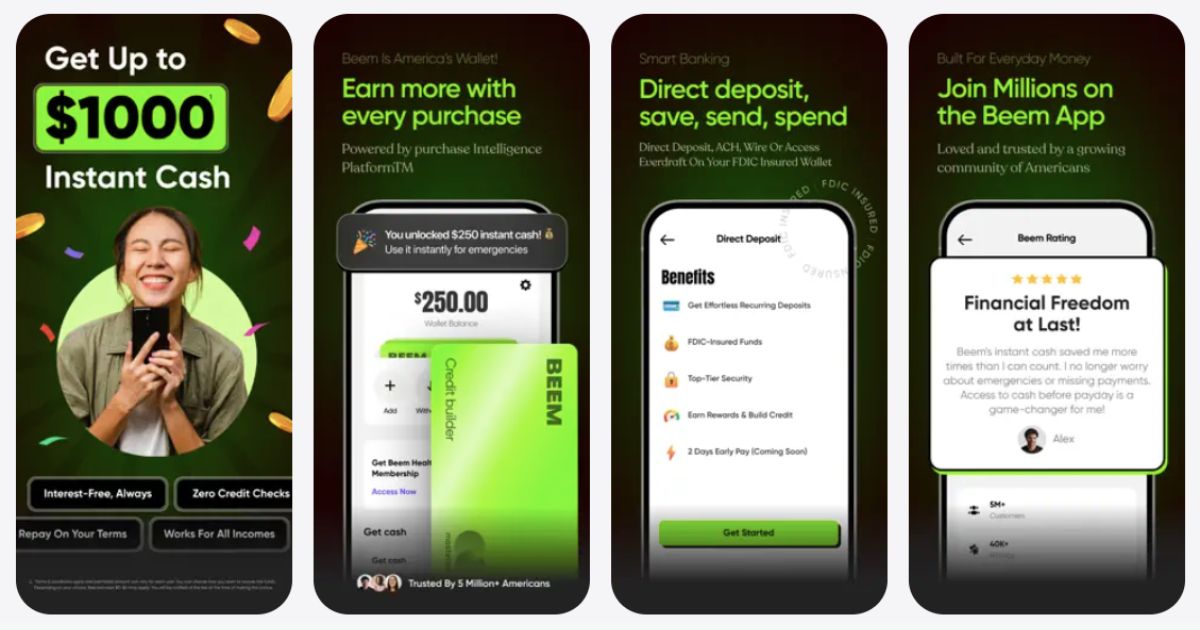
To get started:
Go to the Apple App Store or Google Play Store.
Download and install the app.
Open the app and tap Sign Up.
You will need to enter basic details such as:
Full name
Email address
Phone number
Date of birth
Make sure the information matches your official documents because identity verification may be required.
Step 2: Create and Verify Your Account
After signing up, you will go through a quick verification process. This helps protect your account and prevent fraud.
You may be asked to:
Confirm your phone number with a verification code
Provide identifying information
Complete basic identity checks
This is standard for financial apps in the United States.
Step 3: Link Your Bank Account
To unlock most features, you need to securely connect your bank account.
This allows Beem to:
Review income activity
Determine eligibility for emergency cash
Transfer funds to your account
Provide personalized financial insights
The connection is encrypted and designed to keep your data secure. Follow the in-app prompts to log into your bank safely.
How to Use Everdraft™ for Emergency Cash
If you need short-term financial support before payday, Everdraft™ is one of the main features inside Beem.
Here is how to use it:
Open the app.
Navigate to the Everdraft™ section.
Check your eligibility and available amount.
Select the amount you want.
Confirm the request.
Wait for the funds to be deposited into your linked bank account.
Processing time can vary depending on your bank and the transfer option you select.
This feature can help cover urgent expenses such as rent, groceries, gas, or medical bills when your account balance is low.
How to Use the Free Credit Builder Card
Building credit can feel complicated, but Beem makes it straightforward.
Once approved for the credit builder card:
Activate the card in the app.
Add it to Apple Wallet or Google Wallet.
Use it for regular purchases.
Make payments on time.
Each responsible payment can help strengthen your credit profile over time.
Tips for Better Credit Results
Use the card for small recurring expenses like gas or streaming services.
Avoid maxing out your available limit.
Pay consistently and on time.
Monitor your credit progress regularly.
You do not need to spend large amounts to build credit. Consistency matters more than volume.
How to Compare Insurance Quotes on Beem
Beem also works as an insurance comparison marketplace.
To use it:
Go to the insurance section in the app.
Enter your vehicle and driver details.
Review personalized quotes.
Compare pricing and coverage options.
Choose a plan that fits your needs and budget.
This saves time because you do not have to visit multiple insurance websites individually. You can view different rates in one place and make a more informed decision.
How to Use DealsGPT to Save Money
DealsGPT is an AI-powered savings tool built into Beem.
You can use it to find:
Restaurant discounts
Shopping deals
Subscription savings
Travel offers
Everyday spending discounts
Simply search for what you need, and the tool will suggest available savings options. This feature is helpful if you are trying to reduce monthly expenses without changing your lifestyle dramatically.
How to Track Spending and Budget
Beem also includes budgeting tools to help you understand where your money goes.
Inside the app, you can:
Review recent transactions
Monitor account balances
Identify spending trends
Set simple financial goals
If you often feel unsure about where your paycheck disappears, these tools can provide clarity.
Is Beem Safe to Use?
Yes, Security is important when connecting financial accounts. Beem uses:
Secure encryption
Identity verification processes
Bank-level authentication standards
To protect yourself further:
Use a strong password.
Enable device security features like Face ID or fingerprint login.
Avoid accessing financial apps on public Wi-Fi networks.
Who Should Use Beem?
Beem can be helpful if you:
Experience occasional cash flow gaps
Want to build or rebuild your credit
Need to compare insurance rates
Prefer managing multiple financial tools in one app
Want help finding discounts and deals
It is especially useful for gig workers, hourly employees, freelancers, and anyone with variable income.
How to Get the Most Value From Beem
To maximize the benefits:
Use the credit builder card regularly and responsibly.
Only request emergency cash when necessary.
Check DealsGPT before making major purchases.
Compare insurance rates annually.
Monitor your spending trends inside the app.
Beem works best as a financial support tool that complements smart budgeting habits.
Final Thoughts
If you are asking how do I use Beem, the process is simple. Download the app, complete your setup, connect your bank account, and explore the features that match your financial needs.
Whether you need short-term cash support, want to build credit, compare insurance quotes, or find savings opportunities, Beem brings these tools together in one streamlined platform. Used responsibly, it can help you manage cash flow, improve financial habits, and make smarter money decisions over time.
Was this article helpful?
That’s Great!
Thank you for your feedback
Sorry! We couldn't be helpful
Thank you for your feedback
Feedback sent
We appreciate your effort and will try to fix the article